Universe Screener
InvestLens Screener helps you filter and explore a broad universe of Canadian and U.S. stocks and ETFs using a proprietary Ranking System. It is designed to get you from “too many tickers” to a clean shortlist for portfolio research.
InvestLens supports three screening modes: Theme, Profile, and Custom slicing.
1. Screen by Theme
Themes are predefined “investment lenses” that narrow the universe using a consistent set of filters. Themes are designed for fast discovery and for building shortlists that match a broad objective (for example: income, quality, low volatility, or core beta exposure).
What Themes do
- Focus screening on a curated set of sectors, industries, ETF categories, or broad benchmark exposures.
- Surface candidates using the Ranking System within the selected bucket/group.
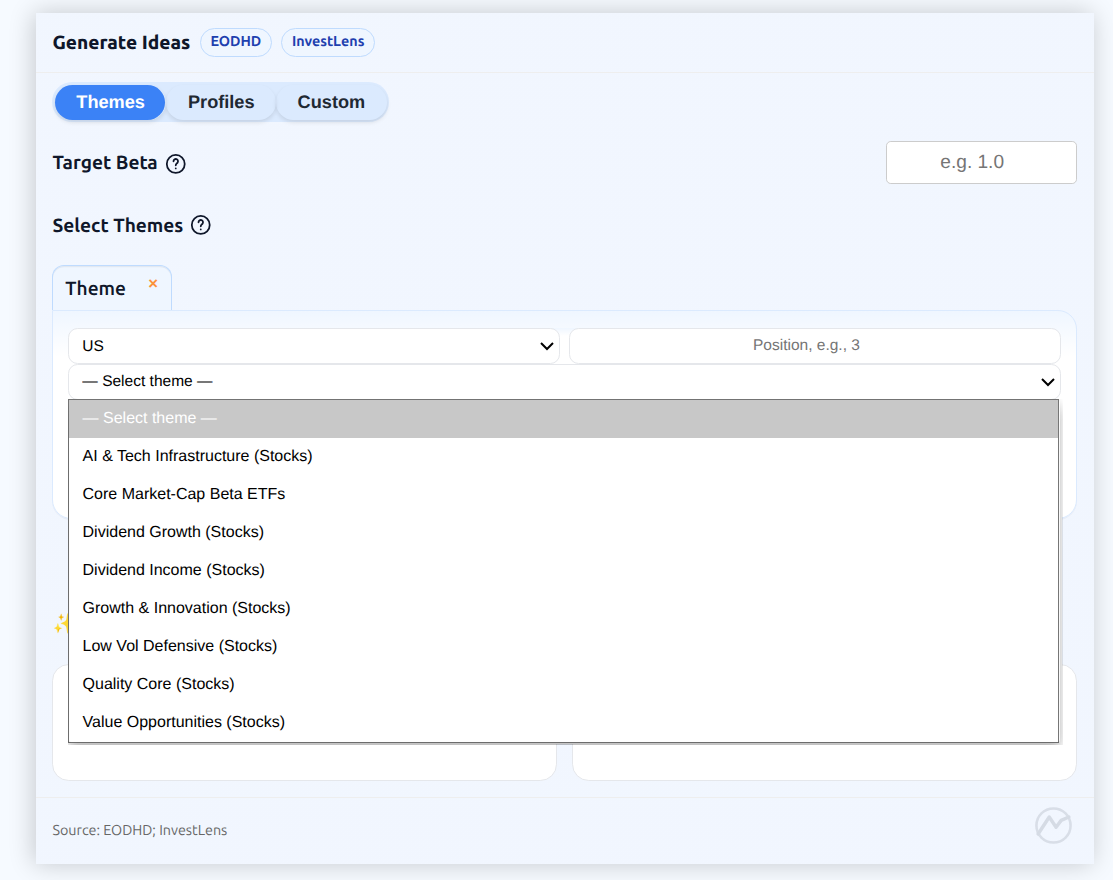
1.1 Themes
| Theme | Description |
|---|---|
| Dividend Income (Stocks) | Built from four sectors (Utilities, Real Estate, Consumer Defensive, and Financials/Financial Services), using moderate beta caps and minimum liquidity, valuation, and quality screens, with higher dividend-yield thresholds. |
| Dividend Growth (Stocks) | Allocated across three sectors (Consumer Defensive, Healthcare, Industrials), emphasizing stronger quality screens with moderate beta limits and sustainable dividend-yield thresholds. |
| Quality Core (Stocks) | Built from three sectors (Technology, Healthcare, Industrials) and three benchmark constituents (S&P 500, S&P 400, TSX Composite). Applies moderate beta caps, high-quality screens, and minimum liquidity and valuation thresholds. |
| Growth & Innovation (Stocks) | Distributed across three sectors (Technology, Communication Services, Consumer Cyclical) with an options-activity screen, targeting higher-beta stocks with a low liquidity threshold and higher quality requirements. |
| Value Opportunities (Stocks) | Built across Industrials, Energy, and Financials/Financial Services, with a valuation tilt, minimum liquidity and baseline quality under moderate beta limits. |
| Low Vol Defensive (Stocks) | Exposure spans four defensive sectors (Utilities, Consumer Defensive, Healthcare, Real Estate), constrained by lower beta caps and baseline liquidity and quality criteria. |
| AI & Tech Infrastructure (Stocks) | Exposure spans four Technology industries (Semiconductors, Semiconductor Equipment & Materials, Software–Application, Software–Infrastructure), emphasizing higher-beta stocks subject to liquidity minimums and higher quality requirements. |
| Core Market-Cap Beta ETFs | Built from low-cost, highly liquid, market-cap-weighted ETFs spanning broad equity categories (US, Canada, North America, Global) and benchmark-linked slices (S&P 500, TSX Composite). |
2. Screen by Profile
Profiles are predefined screening presets that reflect a more complete “style” (for example: conservative income, balanced income-growth, quality core, growth tilt, or ETF core exposure). Profiles typically combine multiple slices of the universe (for example: several sectors, industries, and ETF categories) to express a target style.
What Profiles do
- Combine multiple slices (stocks and/or ETFs) under one consistent style.
- Use stricter or more targeted constraints than broad Themes.
- Produce a ranked shortlist that is aligned to a risk posture (for example: conservative vs growth-oriented).
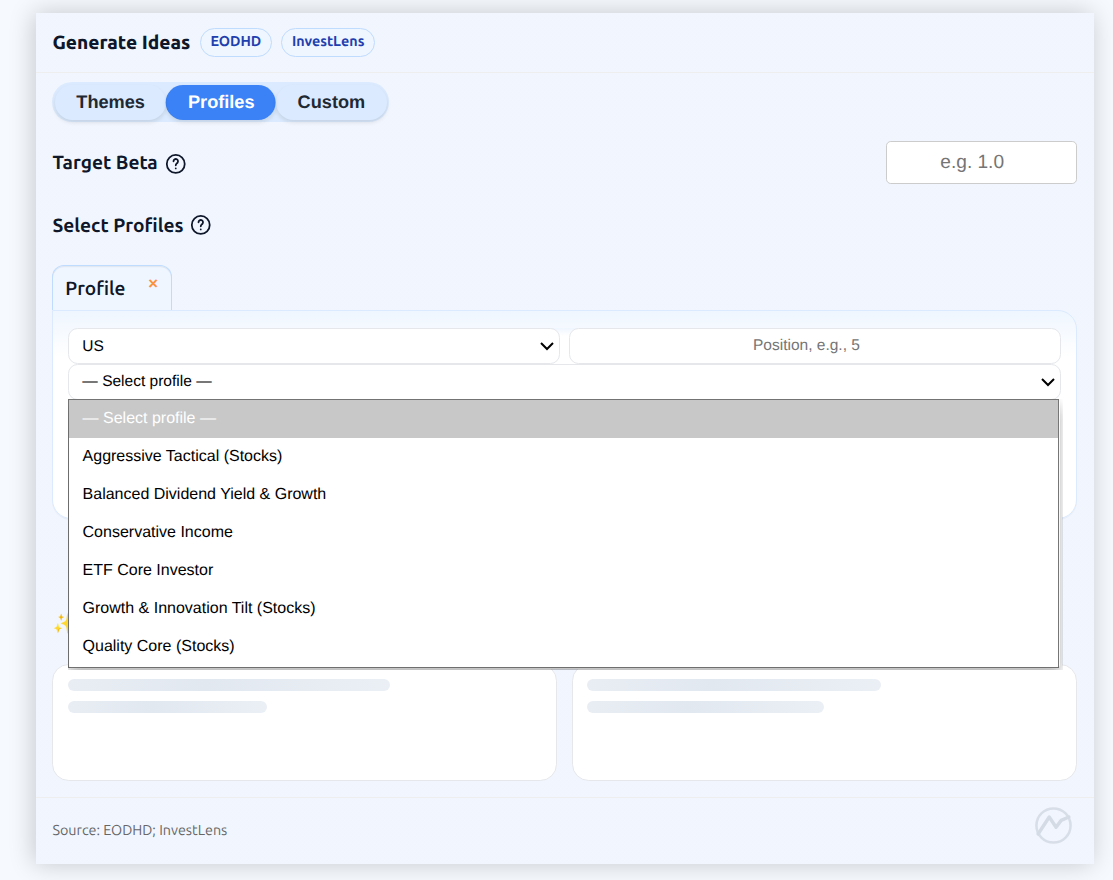
2.1 Profiles
| Profile | Description |
|---|---|
| Conservative Income | Designed to prioritize capital preservation by targeting lower-beta stocks: (Utilities, Real Estate, Consumer Defensive, Financial Services) and dividend-focused ETFs (U.S., Canadian, and Global Dividend & Income Equity). |
| Balanced Dividend Yield & Growth | Distributed across four stock sectors (Consumer Defensive, Healthcare, Industrials, Financial Services) with three core dividend ETF categories (U.S., Canadian, and Global Dividend & Income Equity), targeting moderate beta and quality screens while maintaining income exposure. |
| Quality Core (Stocks) | Distributed across four sectors (Technology, Healthcare, Industrials, Financial Services), emphasizing liquid large/mid-cap names with higher quality and valuation thresholds and moderate beta caps. |
| Growth & Innovation Tilt Profile (Stocks) | Built from four high-growth industries: Semiconductors, Software - Application, Software - Infrastructure (within Technology sector) and Internet Content & Information (Communication Services), accepting higher beta in exchange for stronger quality screens in innovation-heavy industries. |
| Aggressive Tactical (Stocks) | Distributed across four cyclical/high-beta sectors (Technology, Consumer Cyclical, Communication Services, Industrials), using liquidity and quality minimums while allowing higher beta for opportunistic tilts and larger drawdown tolerance. |
| ETF Core Investor | Distributed across five broad-market ETF categories (US Equity, Canadian Equity, North American Equity, Large Blend, Global Large-Stock Blend), emphasizing scale and structure screens with moderate beta limits for diversified core exposure. |
Theme and Profile definitions are maintained by InvestLens and may evolve over time as the underlying data and universe coverage change. New Themes or Profiles can be added as we continue to evaluate feedback from practitioners.
3. Screen by Custom slicing
Custom slicing is the most flexible mode. It lets you define exactly how the universe is segmented before ranking and filtering are applied.
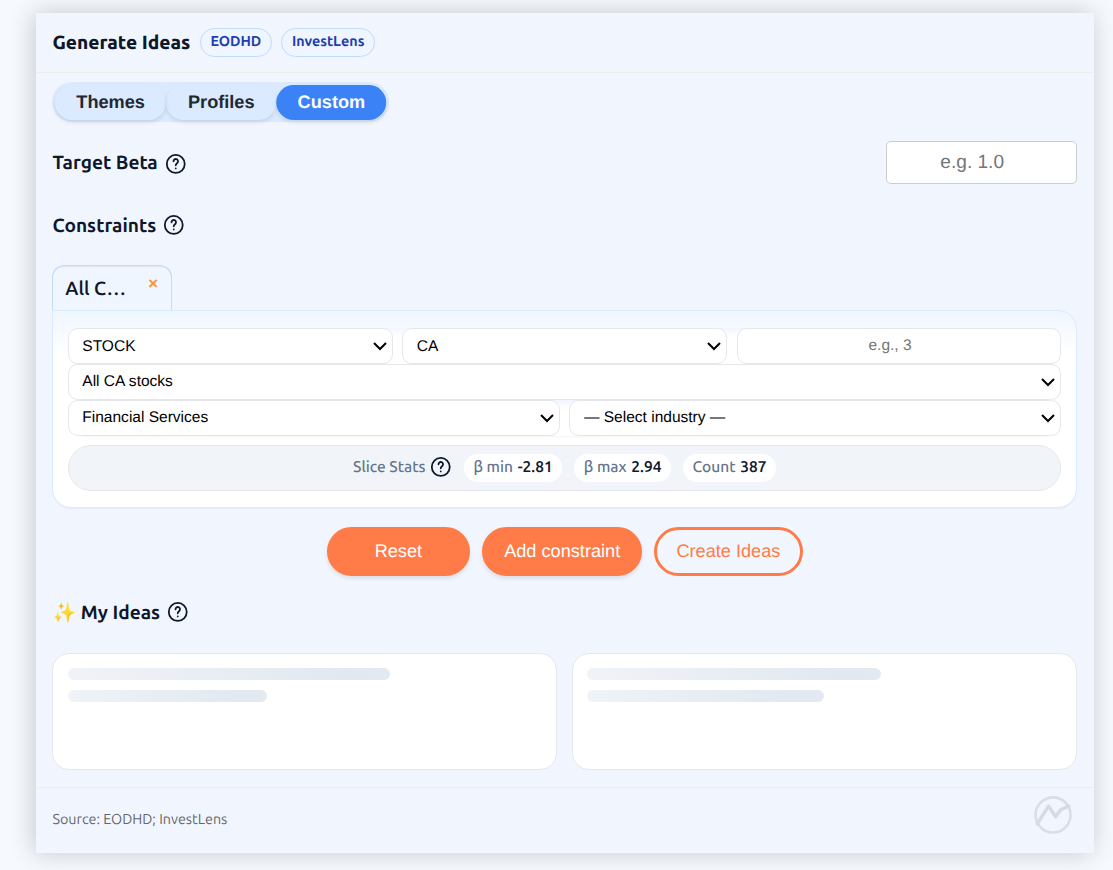
3.1 Custom slicing rules
- Asset Type (STOCK or ETF), Country (Canada or U.S.), and a position count are required.
- A Benchmark must be selected before the Sector and Industry filters become available.
- Once a benchmark is chosen, you can narrow further by Sector, and by Industry within a Sector (Industry cannot be selected without Sector). ETF rows slice by ETF category rather than by sector/industry.
Examples
- U.S., S&P 500 benchmark (stocks)
- U.S., S&P 500 benchmark, Technology sector, Semiconductors industry
- Canada, TSX Composite benchmark, Industrials sector
4. Example Workflow
- Pick a country: Canada.
- Choose an idea size (for example, 5 assets).
- Select the Balanced Dividend Yield & Growth Profile.
- (Optional) set risk tolerance by specifying target Beta.
- Press Create Ideas.
- Save ideas. They can be viewed under My Ideas tab.
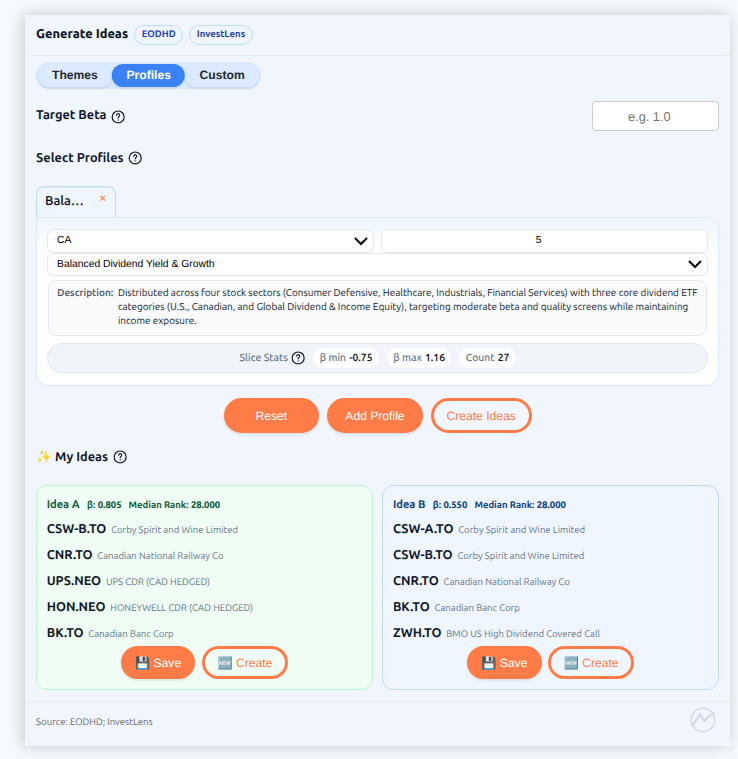
Notice that Idea A is a rank-driven list based on the composite score from our Ranking System and, when you set a target Beta, it steers the list's average beta toward your target within a near-optimal rank band. Idea B is an alternative shortlist drawn from the same top-ranked pool but does not apply the target-Beta constraint — it offers a different mix of high-ranked candidates worth reviewing alongside Idea A.
For each Theme, Profile, or Custom slice, InvestLens also provides a brief summary including the Beta bracket and the number of eligible assets, making it easier to choose an appropriate target Beta.
InvestLens selects idea lists using a two-step optimization that balances rank quality with risk control. First, it builds the best-ranked list possible within the chosen pools (for example, theme/profile slices), aiming to pick the requested number of assets while keeping selections concentrated near the top of each pool’s ranked list. Second, if you specify a target beta, InvestLens adjusts the selection to bring the average beta of the final list closer to that target, while enforcing a “do not ruin the ranking” guardrail so the beta adjustment only happens within a near-optimal rank band.